









Lifestyle

Share
Published 09:25 15 Mar 2016 GMT
Updated 09:22 16 Mar 2016 GMT

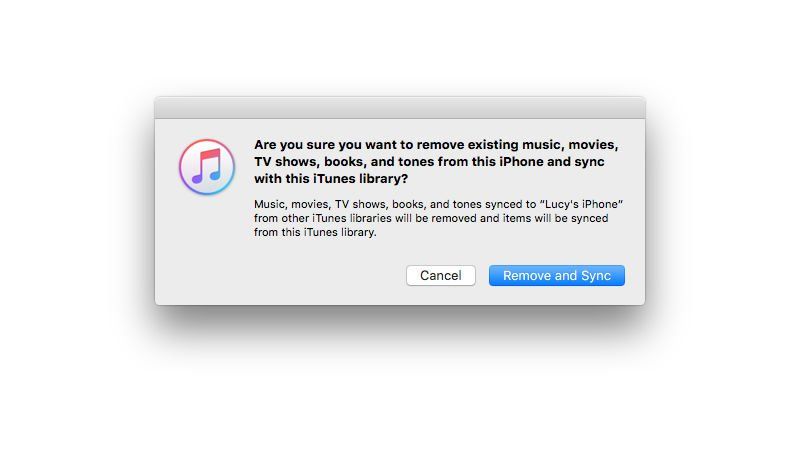 Use a third party app to take care of your sync.
An app like AnyTrans can do all of the heavy lifting of syncing your iPhone. Once you download the app to your computer, syncing over your desired content is a relatively straightforward case of selecting all of the media you want on your phone and sending it over to be synced.
Manage your iPhone manually.
Your second method involves a little bit more tech wizardary, but is no less rewarding.
As started on the official Apple Support website, "When manually managing content, you can add content from multiple libraries to your iPod or iPad. Even when manually managing music."
The trick to avoid having your phone wiped during your first install is to use a third party app like AnyTrans to store you stuff. Once you've set your iPhone to manually manage music and videos mode you'll be able to transfer music from multiple Macs without getting the alert to remove your content.
It's a little fiddly, but more than worth it to keep that special album of yours. Never get caught out again.
Use a third party app to take care of your sync.
An app like AnyTrans can do all of the heavy lifting of syncing your iPhone. Once you download the app to your computer, syncing over your desired content is a relatively straightforward case of selecting all of the media you want on your phone and sending it over to be synced.
Manage your iPhone manually.
Your second method involves a little bit more tech wizardary, but is no less rewarding.
As started on the official Apple Support website, "When manually managing content, you can add content from multiple libraries to your iPod or iPad. Even when manually managing music."
The trick to avoid having your phone wiped during your first install is to use a third party app like AnyTrans to store you stuff. Once you've set your iPhone to manually manage music and videos mode you'll be able to transfer music from multiple Macs without getting the alert to remove your content.
It's a little fiddly, but more than worth it to keep that special album of yours. Never get caught out again.
Lifestyle

Lifestyle

Lifestyle
Lifestyle
Anthropic revenue soars 45% to $16.8bn before stock listing
Anthropic briefs investors as it prepares for possible IPO Anthropic is preparing investors for a possible stock market debut later this year after revealing that its revenue reached $16.8 billion in the third quarter, marking another sharp increase for the company behind Claude. The figures were presented to potential investors at the firm’s San Francisco […]
Lifestyle
4 days ago
Save 80% on this 5th Generation Apple iPad with 32GB Storage
Don’t miss out on this Apple iPad Wowcher offer Wowcher is running yet another tech offer you cannot miss out on this week, with 80% off a refurbished fifth-generation Apple iPad. If you’re looking to buy an iPad that won’t cost you a small fortune, then look no further than this Wowcher deal. Wowcher is […]
Lifestyle
1 week ago
‘I returned home to find someone parked in my driveway – so I ruined their weekend’
Lifestyle